message
- AbstractItem.message(mess, options)
- Domain:
client
- Language:
javascript
- Class:
Description
Use message method to create a modal form.
Parameters
Parameter |
Type |
Description |
||||||||||||||||||||||||||||||||||||
|---|---|---|---|---|---|---|---|---|---|---|---|---|---|---|---|---|---|---|---|---|---|---|---|---|---|---|---|---|---|---|---|---|---|---|---|---|---|---|
|
|
Specifies the text or HTML content that will appear in the body of the form. |
||||||||||||||||||||||||||||||||||||
|
|
Is an object with the following attributes:
|
The buttons Object
The buttons attribute defines the buttons displayed in the footer of the form.
It is a plain object where each key/value pair describes one button.
Key |
Value type |
Description |
|---|---|---|
|
|
Functions executed when the button is clicked |
|
|
Functions executed when the button is clicked |
|
|
Functions executed when the button is clicked |
Example
var buttons = {
        Yes: yesCallback,
        No: noCallback,
        Cancel: cancelCallback
    };
Return
The method returns a jquery object of the form. To programmatically close
the form pass this object to the hide_message method.
Examples
The following code will create a yes-no-cancel dialog:
function yes_no_cancel(item, mess, yesCallback, noCallback, cancelCallback) {
    var buttons = {
        Yes: yesCallback,
        No: noCallback,
        Cancel: cancelCallback
    };
    item.message(mess, {buttons: buttons, margin: "20px",
        text_center: true, width: 500, center_buttons: true});
}
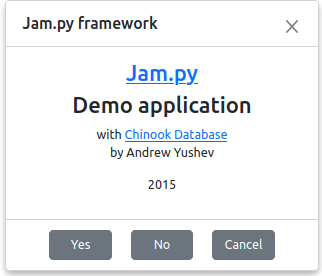
task.message(
    '<a href="http://jam-py.com/" target="_blank"><h3>Jam.py</h3></a>' +
    '<h3>Demo application</h3>' +
    ' with <a href="http://chinookdatabase.codeplex.com/" target="_blank">Chinook Database</a>' +
    '<p>by Andrew Yushev</p>' +
    '<p>2015</p>',
    {title: 'Jam.py framework', margin: 0, text_center: true,
        buttons: {"Yes": undefined, "No": undefined, "Cancel": undefined},
        center_buttons: true}
);
The result of the code above will be: