Routing
The Jam.py v7 introduced routing. As Jam.py v5 is a SPA (Single Page Application), there was no need for routing. On the other hand, there was a need to implement, for example, the User registration page with Jam.py v5.
The solution for this problem was similar to creating a registration form.
As seen, the register.html file is using JavaScript AJAX code. Hence, any additional page would need a similar approach, if interacting with the database.
In Jam.py v7, the solution is to process every request in the on_request event handler and defining a response on a valid request.
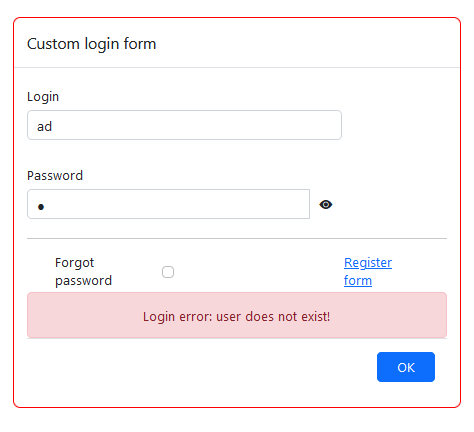
This enables us to do a custom login and registration forms, where custom errors can be created. For example: “User does not exist!”, “Wrong password”, etc.
Example of the login.html page with the error message:
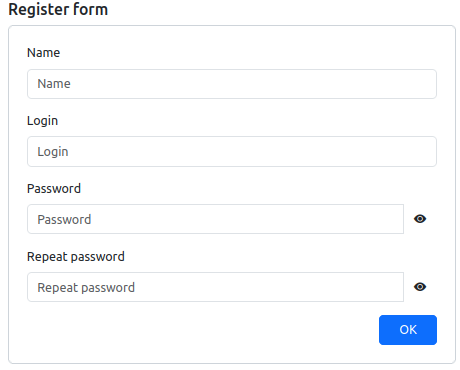
The new register.html page (no AJAX):
Routing code
As mentioned, the on_request is used.
The similar code should exist on “Task/Server Module”. This example exists in the Northwind application, as well as login.html and reset_pass.html files:
#login page handling
def on_request(task, request):
    parts = request.path.strip('/').split('/')

    if not parts[0]:
        if task.logged_in(request):
            return task.serve_page('index.html')
        else:
            return task.redirect('/login.html')
    elif parts[0] == 'login.html':
        login_params = {
            'title': 'NWT login',
            'error': '',
            'form_title': 'Welcome',
            'login_page_text': 'Please login to the Northwind Traders Demo app created with the Jam.py framework. Username/passwd is andrew/111. Safe Mode must be turned on.',
            'login_text': 'User name',
            'password_text': 'Password',
            'login': '',
            'password': ''
        }

        login_path = os.path.join(task.work_dir, 'login.html')

        if request.method == 'POST':
            response = task.login(request, request.form)

            if response:
                return response

            else:
                login_params.update(request.form.to_dict())
                login_params['error'] = login_errors_check(request.form)
                return task.serve_page(login_path, login_params)
        else:
            return task.serve_page(login_path, login_params)

    #pass reset
    elif parts[0] == 'reset_pass.html':
        return task.serve_page('reset_pass.html')
    elif parts[0] == 'ads.txt':
        if task.logged_in(request):
            return task.serve_page('ads.txt')


#login errors check
def login_errors_check(form_data):
    err_mess = ''
    users = task.users.copy(handlers=False)

    if form_data['login']:
        users.set_where(user_login=form_data['login'], user_active=True)
    users.open()

    if not users.rec_count:
        err_mess = 'Login error: user/password does not match!'

    elif users.rec_count:
        if form_data['password']:
            if not task.check_password_hash(users.password_hash.value, form_data['password']):
                err_mess = 'Login error: user/password does not match!'
    return err_mess
The files should exist within the application folder.
The working example for serving robots.txt file:
def on_request(task, request):
    parts = request.path.strip('/').split('/')
    if not parts[0]:
        if task.logged_in(request):
            return task.serve_page('index.html')
        else:
            return task.redirect('/login.html')
    elif parts[0] == 'robots.txt':
        if task.logged_in(request):
            return task.serve_page('robots.txt')
The robots.txt file should exist within the application folder.